
Software Buyer Brief
Log Management Software Checklist Before Buying
Short answer: log management software is worth buying only if it answers incident questions quickly: which sources are covered, how long logs are retained, who can search sensitive records, which alerts route to the right owner, how evidence is exported, and what ingestion or storage choices will make the bill jump.
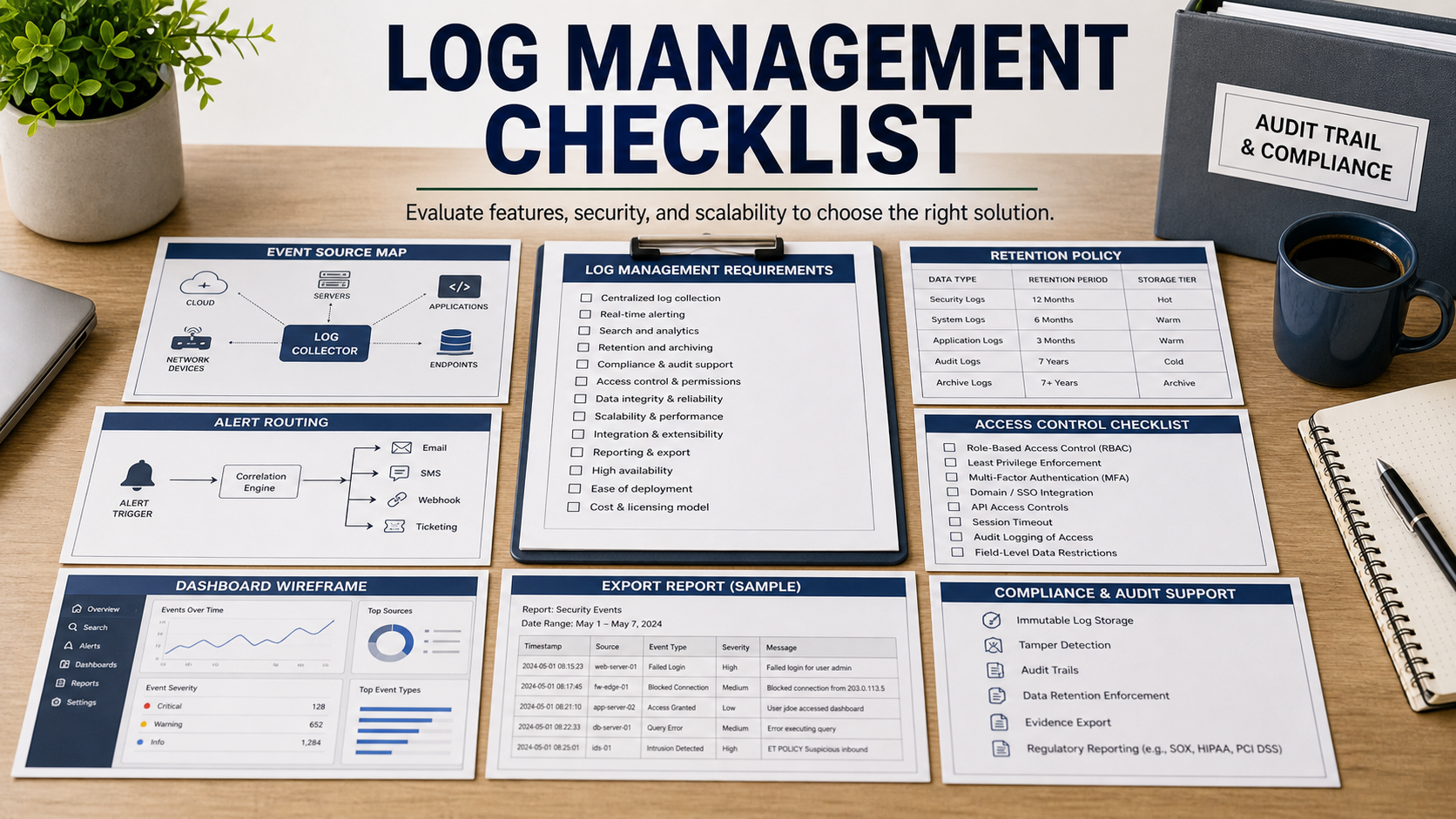
NIST SP 800-92 frames log management as a process, not a storage bucket: generation, transmission, storage, analysis, and disposal all need planning. That is the lens to use in a software demo. A tool that ingests logs but cannot preserve, search, protect, and explain them under pressure will not help much during an incident.
The buyer should also remember that logs can contain personal data, secrets, tokens, IP addresses, employee activity, customer identifiers, and sensitive system details. NIST Privacy Framework and FTC data security guidance both make access control and data minimization relevant, even when the product is bought for security operations.
Map The Event Sources Before The Demo
Start with a source map: identity provider, endpoint security, operating systems, cloud accounts, firewalls, DNS, email, SaaS administration, databases, application logs, CI/CD, and backup systems. Then ask the vendor to mark which sources are native, which need agents, which require paid connectors, and which are not supported.
Coverage gaps should be visible. A log tool that misses cloud admin activity or identity events may look full while missing the events that matter most in account takeover, ransomware, data exposure, or insider investigations.
Define Retention By Use Case
Retention should not be a single default number. Security investigation, legal hold, compliance evidence, troubleshooting, and privacy minimization can require different retention periods. Ask how the product applies hot, warm, cold, and archive retention and what search limitations appear in each tier.
The quote should identify the pricing unit: ingested volume, retained volume, events per second, indexed data, users, seats, queries, archive rehydration, or overage. This is where log management budgets often break after the first month.
Test Search With Real Questions
Bring three plain-language questions to the demo: who logged in from a new country, which admin changed a setting, and what happened on a device before a malware alert. Ask the vendor to run those searches across sources, show time ranges, join fields, and export evidence.
Search speed matters, but so does learnability. If only one specialist can write the query, the tool may not help a small team during an incident. Ask for saved searches, query templates, field normalization, and documentation quality.
Protect Logs From The People Who Search Them
Security logs often expose sensitive behavior. Ask for role-based access, field masking, audit trails for searches, approval workflows for sensitive queries, and restrictions on exporting raw logs. The tool should log the log administrators too.
Also ask how deletion, tamper resistance, retention changes, and account compromise are handled. If a privileged user can silently shorten retention or delete evidence, the system may fail when you need it most.
Log Management Software Review Table
| Requirement | What to ask in the demo | Why it matters |
|---|---|---|
| Source coverage | Show supported, paid, unsupported, and delayed sources. | Missing identity or cloud logs can blind investigations. |
| Retention tiers | Show hot, archive, rehydration, deletion, and legal hold behavior. | Retention affects cost, investigation depth, and privacy risk. |
| Search workflow | Run incident questions across at least three event sources. | Logs are useful only if the team can answer questions fast. |
| Access control | Show search audit logs, field masking, roles, and export limits. | Logs can expose sensitive employee, customer, and system data. |
| Cost controls | Show ingestion filters, sampling, archive policy, and overage alerts. | Log bills can expand faster than the security value. |
Questions To Ask Before Buying
- Which critical systems will not send logs on day one?
- How does the product normalize identity, device, user, IP, and cloud account fields?
- Can the team search archived logs without a long rehydration delay?
- Who can export raw logs, and is that activity audited?
- Can sensitive fields be masked or restricted by role?
- What ingestion filters or routing rules prevent unnecessary cost growth?
- Can alerts create tickets or incident records with the related logs attached?
Red Flags In This Purchase
The demo uses sample logs only and never tests your actual event sources.
The vendor cannot explain which pricing driver causes overage when log volume spikes.
Administrators can delete, export, or shorten log retention without a separate audit trail.
Source Links
- NIST SP 800-92: Guide To Computer Security Log Management
- NIST Cybersecurity Framework
- NIST Privacy Framework
- FTC: Data Security
FAQ
Is log management the same as SIEM?
No. Log management focuses on collection, storage, search, retention, and evidence handling. SIEM usually adds correlation, detection content, and security operations workflows.
How much retention should I buy?
Start from investigation, legal, compliance, and privacy needs. Then price hot search, archive search, and deletion behavior separately.
Should all logs be kept forever?
No. Long retention can increase cost and privacy risk. Keep what you need for defined security, legal, and operational purposes.
What logs matter most for a small team?
Identity, endpoint, cloud admin, email security, firewall, DNS, critical applications, and backup logs are often the highest priority, but the source map should match your environment.
What should I test in the demo?
Ask the vendor to answer real incident questions, export evidence, show access controls, and explain cost behavior using your expected log sources.
Internal Link Candidates
The right log management tool does not just store events; it lets a small team answer high-pressure security questions without losing control of cost or sensitive data.