
SaaS management software should help teams discover apps, map owners, track renewal dates, measure license use, review SSO and admin access, find shadow IT, manage cancellation workflow, and report spend without relying on a spreadsheet that is updated once a year.
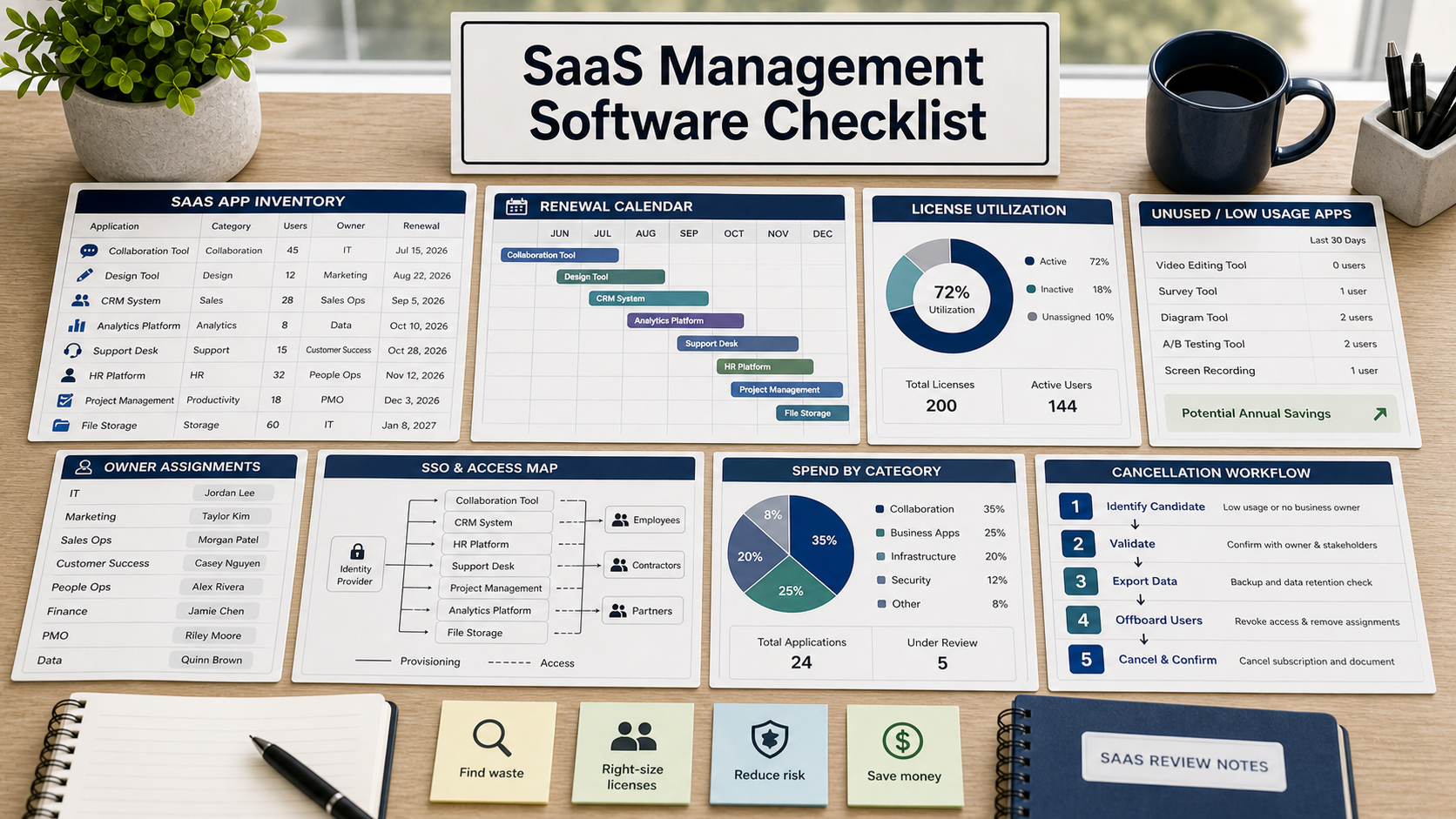
This guide is for a company that discovers software renewals too late. The finance team sees charges, IT sees access risk, legal sees contracts, and department owners see tools they still want. Nobody has a complete inventory.
A SaaS management tool should make that inventory operational. It should not only show spend. It should show who owns each app, who uses it, what access it has, when it renews, and what happens if the company cancels.
Start With App Discovery
Ask how the product discovers SaaS applications. Common signals include SSO, browser extensions, expense data, accounting data, contract records, identity logs, and manual entries. Each method has blind spots.
NIST Cybersecurity Framework asset management concepts are useful here: teams need to know what technology assets exist before they can manage risk.
Owner Mapping Is Not Optional
Every app should have a business owner, technical owner, renewal owner, and security contact where appropriate. Without owners, renewal reminders become noise.
Ask whether ownership can be assigned by app, department, contract, data category, or renewal stage. Then ask what happens when an owner leaves.
License Utilization Should Be Explainable
License use can be tricky. Logins, active seats, feature use, provisioned accounts, and paid seats may not mean the same thing. Ask how the product defines usage and whether those definitions can be audited.
Do not rely on a dashboard number unless the team understands where it came from.
SaaS Management Buying Table
| Buying area | Demo question | Why it matters |
|---|---|---|
| Discovery | Which systems feed the app inventory? | One signal rarely finds every SaaS tool. |
| Ownership | Can business, IT, legal, and finance owners be assigned? | Renewal work needs accountable owners. |
| Renewals | Can notices, contract terms, and cancellation windows be tracked? | Late reminders can lock in unwanted renewals. |
| Security | Can the tool show SSO coverage, admins, and inactive users? | Unused tools can still hold access and data. |
| Reporting | Can reports separate spend, use, risk, and owner action? | Finance and IT need different views of the same inventory. |
Renewal Workflow Should Include Cancellation
Ask whether the system tracks notice periods, auto-renewal terms, legal review, procurement approvals, cancellation tasks, data export, and access shutdown. A renewal calendar that cannot manage cancellation is only half useful.
Security Access Review Belongs In Scope
Ask whether the product can show which apps are connected to SSO, which apps have local passwords, who has admin roles, and whether inactive users remain provisioned.
FTC data security guidance encourages reasonable practices around access and data. SaaS sprawl makes those practices harder without inventory.
Questions To Ask Before Buying
- How does the tool discover SaaS apps?
- What data sources are required?
- Can each app have clear owners?
- How does the tool define active usage?
- Can it track renewal and cancellation windows?
- Can it show admin access and SSO coverage?
- What happens to data when an app is cancelled?
Primary Security & Architecture References
- NIST Cybersecurity Framework
- FTC: Data security guidance for businesses
- NIST: Small Business Cybersecurity Corner
- NIST: Privacy Framework
FAQ
Is SaaS management the same as IT asset management?
They overlap, but SaaS management focuses on cloud app inventory, renewals, usage, ownership, spend, and access review.
Can expense data find every SaaS app?
No. It can help, but apps may be free, bundled, invoiced differently, or paid outside standard expense channels.
Should finance or IT own the tool?
Usually both need it. Finance cares about spend and renewals; IT and security care about access, data, and app inventory.
What is shadow IT?
It is software used without the normal approval, ownership, security, or procurement process. SaaS discovery can help surface it.
What is the main buying risk?
The main risk is buying spend reporting when the company really needs ownership, renewal workflow, and security access visibility.
Related Vendor Comparison Guides
- Inventory management software buying checklist
- Expense management software buying checklist
- Contract management software buying checklist
Before the demo, bring five real apps: one renewed recently, one unused, one ownerless, one security-sensitive, and one you may cancel.
Pilot Acceptance Criteria and Order-Form Controls for SaaS Management
Before moving a saas management evaluation from technical pilot to procurement sign-off, translate your findings on Start With App Discovery and Owner Mapping Is Not Optional into measurable acceptance criteria attached to the order form. Features demonstrated in a vendor sandbox should be validated against production-scale permissions, failure recovery, and admin overhead.
- Hands-on pilot validation: Test start with app discovery with representative team roles, live integration payloads, and exception queues rather than pre-scripted demo data.
- Operational and security ownership: Document which internal administrator owns owner mapping is not optional, audit log review, and vendor support escalation after launch.
- Commercial and exit protections: Verify the multi-year renewal caps, overage triggers, and full schema export steps outlined under license utilization should be explainable before executing the agreement.
When comparing two vendor proposals across seat growth, platform fees, onboarding, and exit migration, model the full contract commitment in our multi-year software TCO calculator.