
Choose GRC software only if a small team can use it to map obligations to controls, assign risk owners, request and reuse evidence, approve policies, track exceptions, export audit-ready reports, and prove what changed over time without hiring a full compliance operations team.
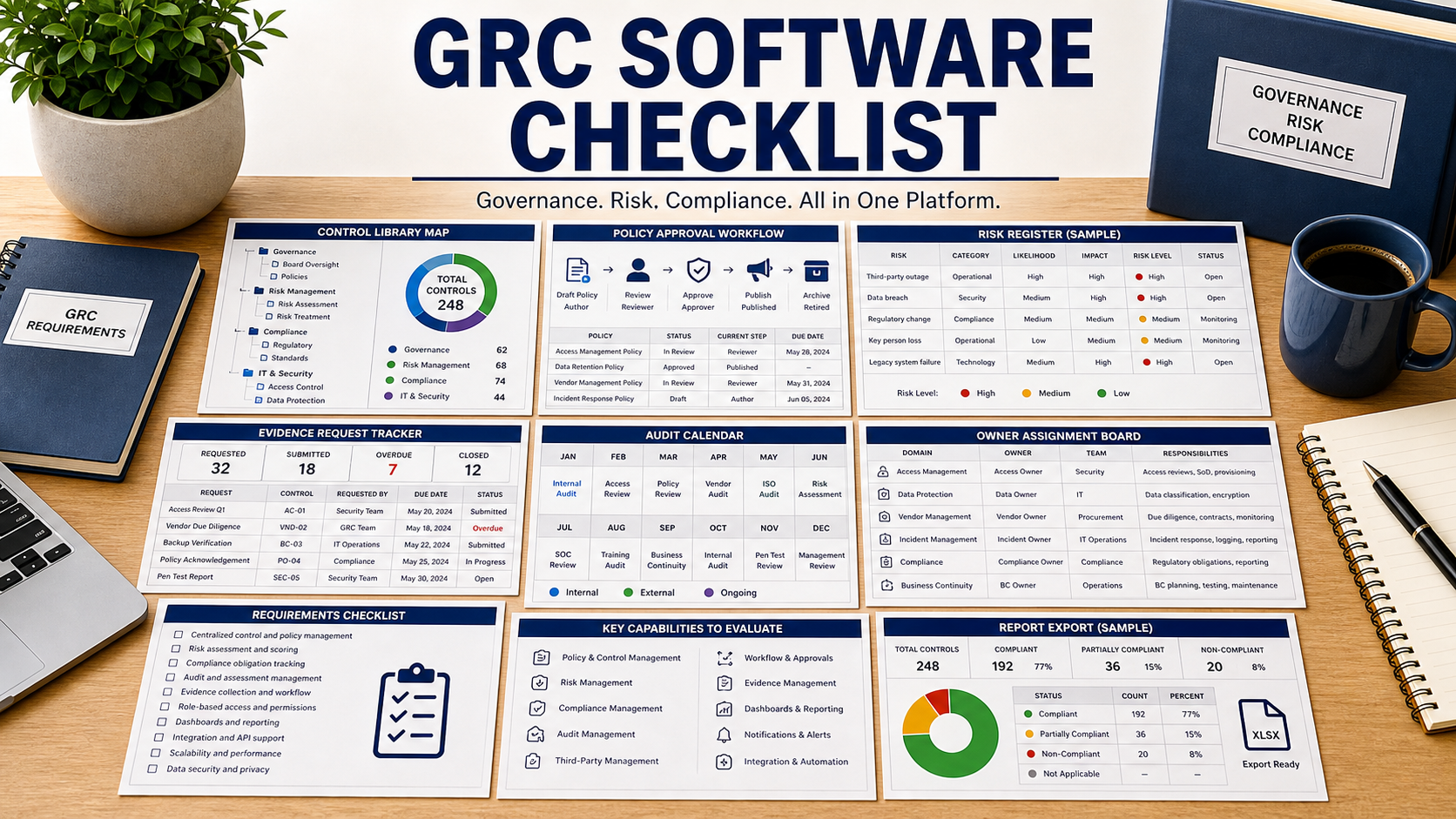
A GRC demo can look impressive while hiding the real work. The vendor clicks through frameworks, dashboards, and maturity scores. After purchase, your two-person security or operations team still has to chase evidence, explain controls to owners, update risks, and answer customer questionnaires.
As of June 2026, NIST Cybersecurity Framework 2.0 is built around six functions, including the added Govern function. That matters for buying because a GRC tool should not just store compliance rows. It should show who owns risk decisions, what policy expectations exist, and whether evidence supports those decisions.
Start With The Work, Not The Framework Count
Ask the vendor to map one real requirement your team already handles: a customer security questionnaire control, a SOC 2 evidence request, a privacy review, or an internal risk exception. Do not begin with a list of every framework the product claims to support.
The buying question is simple: can one control point to the same owner, policy, evidence, risk, exception, and report in one place? If not, the tool may become a second spreadsheet with a nicer interface.
Check CSF 2.0 Governance Fit
NIST CSF 2.0 puts governance around cybersecurity risk management strategy, expectations, policy, and oversight. A GRC product should make those items visible as operating work, not just dashboard labels.
In the demo, create a policy review task, assign an executive or system owner, link it to a control, attach evidence, and show what report changes when the owner approves or rejects the item. That test reveals whether governance is a workflow or just a section name.
Make Risk Ownership Concrete
A useful risk register has more than likelihood and impact. It should show business owner, affected system, treatment choice, target date, accepted residual risk, approval history, and the next review date.
For small teams, owner updates matter. If every risk status change requires an administrator, the GRC team becomes a bottleneck. Ask whether non-admin owners can update status, add evidence, and see only the items assigned to them.
Test Evidence Reuse And Expiration
NIST’s Risk Management Framework describes a lifecycle that includes control selection, implementation, assessment, authorization decisions, and continuous monitoring. A small-team GRC system should help evidence move through that lifecycle without repeated screenshot collection.
Ask what happens when one evidence file supports multiple controls. Then ask what happens when that file expires, the system owner changes, or an auditor rejects it. Evidence reuse is valuable only if the tool also tracks freshness and approval history.
Separate Policies, Exceptions, And Attestations
Policy approval is not the same as employee acknowledgment, and neither is the same as an exception. A good tool separates those workflows so leadership can approve a policy, employees can attest to it, and a temporary exception can expire on schedule.
Small teams should look for simple routing: draft, reviewer, approver, effective date, next review, related controls, exceptions, and acknowledgement campaign. If those are all free-text notes, the product will be hard to audit later.
Include Privacy And Data Security Work
FTC business guidance emphasizes knowing what personal information the business has, protecting what it keeps, disposing of what it no longer needs, and planning for incidents. GRC software should support that practical inventory and accountability work.
Ask whether the product can connect data classification, vendor reviews, privacy impact questions, retention decisions, and incident response evidence. If privacy work lives outside the tool, the risk view will be incomplete.
Review Reporting Before Buying
Do not accept a generic executive dashboard as proof. Export the report your team actually needs: audit evidence by control, open risks by owner, overdue policy reviews, expired evidence, accepted exceptions, and customer-facing security summary.
Reports should include timestamps, owners, source evidence, filters, and change history. A chart without drill-down will not help when an auditor asks how a control was tested.
Calculate The Operating Load
Implementation services can be useful, but the purchase should not depend on consultants doing routine administration forever. Ask how many hours are required each month to keep controls, owners, policies, risks, and evidence current.
For a small team, the best GRC tool is often the one that removes recurring chase work. The worst one adds a formal process that nobody has time to maintain.
GRC Software Review Table
| Review area | What to test in the demo | Small-team risk |
|---|---|---|
| Control mapping | Map one obligation to owner, policy, evidence, and report | Large libraries can hide weak workflow. |
| Risk register | Assign owner, treatment, due date, approval, and review cadence | Unowned risks become stale records. |
| Evidence | Reuse one file across controls and expire it automatically | Manual evidence chasing returns every audit. |
| Policies | Route review, approval, attestation, and exception separately | Free-text approvals are hard to prove later. |
| Reports | Export audit-ready evidence, owner status, and exception history | Dashboards without detail do not answer reviewers. |
Questions To Ask Before Approval
- Can one control link to policy, owner, evidence, risk, exception, and report?
- Which NIST CSF 2.0, privacy, or audit mappings are built in, and which require paid setup?
- Can non-admin owners update assigned risks and evidence requests?
- How does the tool flag expired evidence and rejected evidence?
- Are policy approvals, attestations, and exceptions separate workflows?
- Can reports show timestamps, owner history, and source evidence?
- What recurring monthly administration remains after onboarding?
- What data can be exported if the team leaves the platform?
Buying Red Flags
The vendor prices by framework count but cannot show a complete owner-to-evidence workflow during the demo.
The implementation plan says consultants will map everything, but the quote does not explain how your team will maintain mappings after the first audit.
Evidence can be uploaded, but there is no expiration, rejection, reuse, or change history.
Technical Documentation & Reference Links
- NIST: Cybersecurity Framework
- NIST: Cybersecurity Framework 2.0
- NIST SP 800-37 Rev. 2: Risk Management Framework
- NIST: Privacy Framework
- FTC: Data Security Guidance For Businesses
FAQ
What should small teams test first in GRC software?
Test one real control from request to report: map it, assign an owner, request evidence, approve or reject the evidence, and export the result.
Is a large control library enough to justify buying?
No. A large library helps only if the tool also supports ownership, evidence reuse, policy review, exception tracking, and reporting.
Should GRC software support NIST CSF 2.0?
It is useful if the product can make CSF 2.0 governance, risk, and control outcomes operational. A static mapping is not enough.
How should evidence expiration work?
The tool should set evidence age rules, warn owners before expiration, preserve approval history, and show which controls are affected.
What is the biggest small-team buying risk?
The biggest risk is buying a tool that requires more administration than the compliance work it was supposed to reduce.
Related Buying & Pilot Checklists
- Security questionnaire software checklist before demo
- SOC 2 readiness software checklist before buying
- Data classification software checklist before buying
In the demo, do not ask for a tour. Ask the vendor to map one control, request evidence, route a policy approval, assign a risk owner, and export the proof.