
Buy patch management software only if it can see the assets you actually run, prioritize actively exploited vulnerabilities, stage updates through test rings, respect maintenance windows, prove installation status, roll back safely, document exceptions, and export audit-ready evidence.
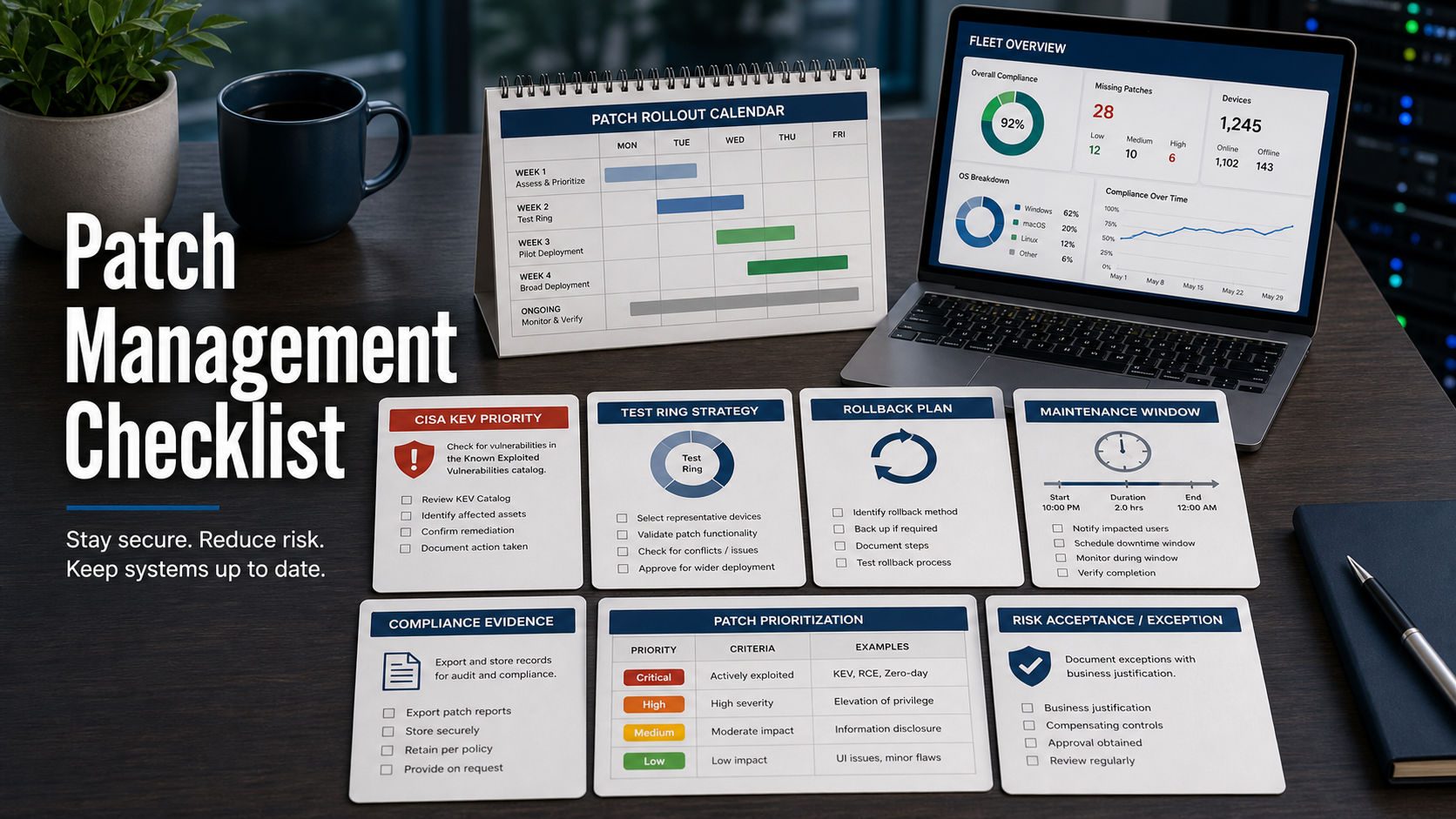
NIST SP 800-40 Revision 4 frames enterprise patching as a planning problem, not just a download button. It covers inventory, prioritization, testing, deployment, verification, and remediation of failures. That is the lens to use in a demo.
CISA’s Known Exploited Vulnerabilities catalog also changes the buying conversation. A patch tool that treats every missing update the same will bury urgent exploited vulnerabilities under routine backlog. Ask how the product maps assets to KEV entries, emergency deadlines, and proof of remediation.
Start With Asset Coverage
The first demo question is simple: what can the tool patch without another product? Check Windows, macOS, Linux, browsers, office suites, developer tools, VPN clients, endpoint agents, servers, cloud workloads, remote laptops, and third-party applications.
Then ask how it discovers unmanaged devices. Patch dashboards look impressive until you find that offline laptops, contractor machines, lab servers, or cloud images are missing.
Prioritize Exploited Risk, Not Only CVSS
CVSS is useful, but it is not enough. Ask whether the tool flags CISA KEV vulnerabilities, vendor exploitation notices, ransomware use, internet exposure, asset criticality, and business owner.
The best workflow lets security and IT agree on emergency patch rules: for example, exploited internet-facing systems are handled differently from low-risk workstation updates.
Demand Test Rings And Deployment Controls
A practical patch rollout needs pilot groups, canary rings, phased deployment, pause controls, health checks, and automatic stop rules when failures spike. The tool should let you target representative devices before broad release.
Ask the vendor to show a real rollout: approve the patch, send it to a pilot group, inspect failures, pause deployment, and then expand to the next ring. Do not accept a slide that only shows a compliance percentage.
Check Maintenance Windows And User Experience
Patching fails when it collides with business hours. The software should support time zones, device wake-up behavior, deferral limits, reboot messaging, blackout dates, server maintenance windows, and post-reboot verification.
For remote teams, ask how the tool handles devices that are off VPN, low battery, asleep, or using metered networks.
Require Rollback And Failure Handling
Ask what happens when a patch breaks printing, VPN, line-of-business apps, or endpoint performance. The product should capture error codes, retry logic, uninstall options where supported, restore-point or snapshot workflows, and owner routing.
Rollback is not always possible for every update. The buying requirement is clarity: the tool should tell admins which fixes can be reversed and which need vendor remediation.
Patch Management Software Review Table
| Requirement | Demo question | Buying signal |
|---|---|---|
| Inventory | Which assets and third-party apps are actually covered? | Coverage gaps are visible, not hidden. |
| Prioritization | How do KEV, exploit signals, and asset criticality change deadlines? | Emergency risk rises above routine backlog. |
| Rollout | Can updates move through pilot, canary, and broad rings? | The tool supports staged change control. |
| Recovery | What happens after failures or bad patches? | Error, retry, rollback, and escalation paths are clear. |
| Evidence | Can we export installed, failed, exempted, and pending records? | Audit evidence matches reality. |
Questions To Ask Before Buying
- What operating systems, browsers, and third-party applications are patched natively?
- How does the tool identify missing, unmanaged, offline, or stale assets?
- Does the dashboard flag CISA KEV vulnerabilities separately?
- Can we define emergency patch SLAs by exploit status and asset criticality?
- Can rollout rings pause automatically after failure thresholds?
- How are reboots, user deferrals, and maintenance windows controlled?
- What rollback options exist for each platform and patch type?
- How are exceptions approved, expired, and reported?
- Can auditors see installed, failed, exempted, and not-applicable statuses?
Red Flags In A Patch Tool Demo
- The vendor cannot show third-party application coverage by product name.
- KEV, exploit status, and asset exposure are not visible in prioritization.
- The rollout flow jumps from approval to all devices with no test ring.
- Failed patches disappear into a generic error count.
- Exceptions have no expiration date or approver record.
- Reports measure “attempted” patches but not verified installation.
Demo move: bring a list of ten real applications and two recent KEV vulnerabilities to the sales call. Ask the vendor to show exactly how those assets are found, prioritized, patched, and proven fixed.
Technical Documentation & Reference Links
- NIST SP 800-40 Rev. 4: Guide to Enterprise Patch Management Planning
- CISA: Known Exploited Vulnerabilities Catalog
- CISA: Secure by Design
- CISA: Secure by Demand Guide
- FTC: Cybersecurity for Small Business
FAQ
Is vulnerability scanning the same as patch management?
No. Scanners identify likely exposure. Patch management software should deploy updates, verify installation, handle failures, and record exceptions.
Should a patch tool use CISA KEV?
Yes. KEV helps teams separate known exploited vulnerabilities from routine backlog, especially when emergency remediation deadlines are needed.
What is a patch rollout ring?
It is a staged deployment group, such as pilot devices first, then a broader canary group, then production. Rings reduce the blast radius of bad updates.
What evidence should the tool export?
Installed status, failed status, not-applicable status, reboot pending, exception reason, approver, deadline, owner, and timestamped remediation records.
What should small teams prioritize?
Start with asset coverage, KEV visibility, third-party application support, reboot control, and simple proof that critical patches were installed.