
Short answer: vulnerability management software is worth buying only if it turns findings into owned remediation work: complete asset coverage, authenticated scanning where needed, CISA Known Exploited Vulnerabilities prioritization, risk-based SLA rules, ticket routing, exception approvals, fix verification, and leadership reporting that shows risk reduction instead of raw CVE volume.
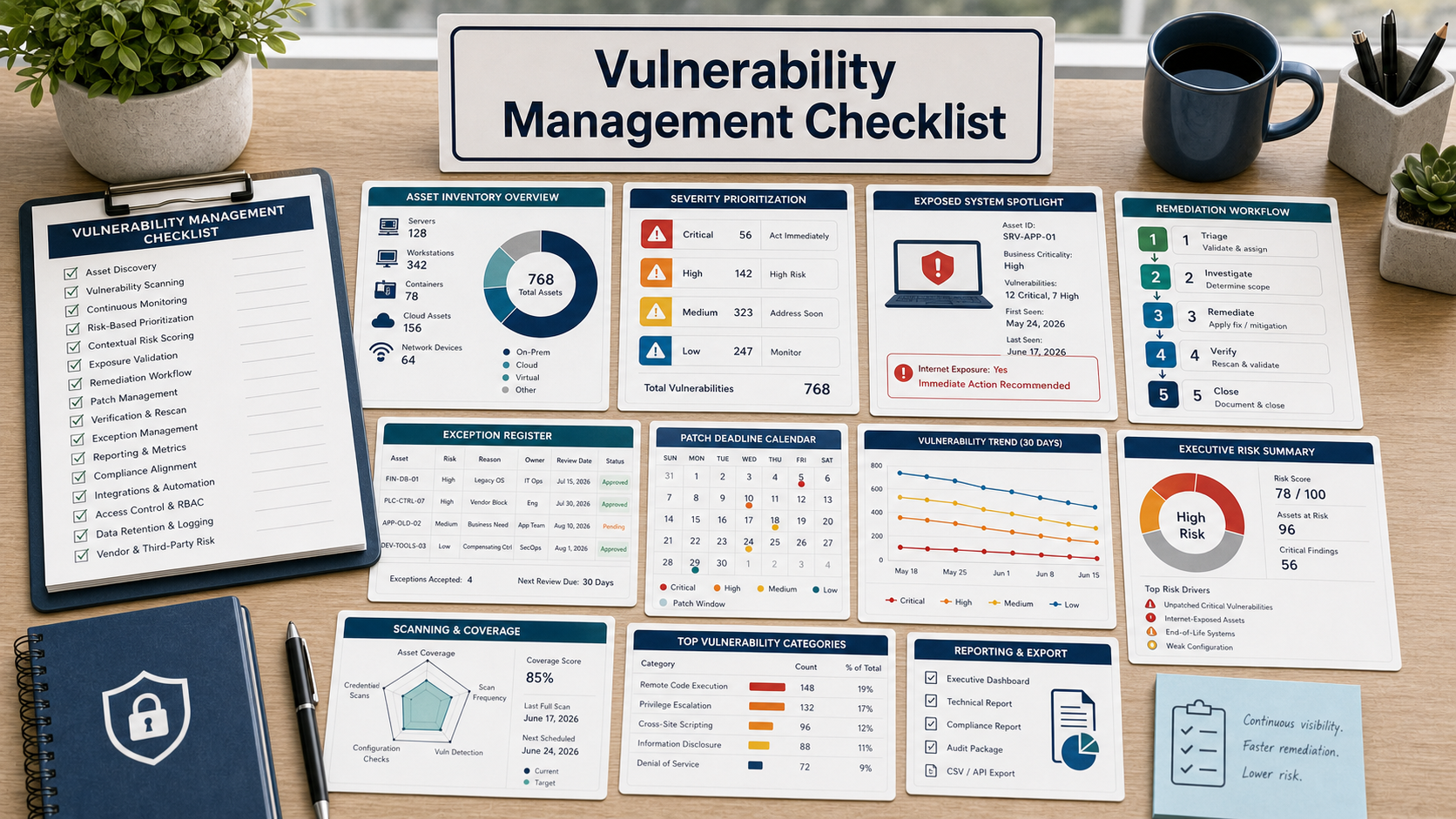
A scanner can create thousands of findings. A vulnerability management program has to decide which exposed systems matter first, who owns the fix, what deadline applies, which exceptions are approved, and how the organization proves the issue is closed. That is the difference your demo needs to test.
As of June 2026, buyers should treat CISA’s Known Exploited Vulnerabilities Catalog as a required prioritization input, not an optional news feed. NIST’s patch management guidance also emphasizes inventory, prioritization, testing, deployment, and verification as a repeatable process. The software should support that workflow end to end.
Start With Asset Coverage Before Severity Scores
Ask the vendor to show which assets it can see: servers, laptops, cloud workloads, containers, internet-facing systems, network devices, SaaS integrations, and end-of-life software. A high severity score on a partial inventory is weaker than a medium severity finding on a critical exposed asset that the team can actually fix.
Coverage should include ownership. If a finding cannot be assigned to a system owner, application team, cloud account, business unit, or managed provider, it will sit in a dashboard. Ask how the tool imports ownership from CMDB, endpoint tools, cloud tags, identity groups, or ticketing systems.
Demand Risk-Based Prioritization You Can Explain
CVSS alone is not enough. Ask how the tool handles CISA KEV status, exploit availability, internet exposure, asset criticality, compensating controls, business impact, and patch availability. The buyer should be able to explain why the top ten findings are top ten today.
Do not accept a black-box priority score without evidence fields. The demo should show the raw reasons behind a priority decision, because remediation teams will challenge false urgency and leadership will ask why some high-severity items were not fixed first.
Test The Remediation Workflow During The Demo
Pick one real software vulnerability, one misconfiguration, one unsupported asset, and one internet-facing exposure. Ask the vendor to route each to the correct owner, attach evidence, set an SLA, open a ticket, update status, and close it only after verification.
The product should support due dates, reassignment, deduplication, patch grouping, maintenance-window notes, and proof of fix. If the tool only exports CSV files, the team will recreate the workflow manually every week.
Make Exception Governance Visible
Every environment has exceptions: fragile legacy systems, vendor-managed appliances, unavailable patches, compensating controls, or business downtime constraints. The software should record who approved the exception, why, for how long, what control reduces risk, and when it must be reviewed again.
Exceptions without expiration dates become hidden risk. Ask the vendor to show an exception register and an executive report that separates accepted risk from overdue remediation.
Vulnerability Management Software Review Table
| Requirement | What to ask in the demo | Why it matters |
|---|---|---|
| Asset coverage | Show missing-asset reports and owner mapping by system type. | Unknown assets cannot be patched or accepted as risk. |
| Exploit prioritization | Show CISA KEV, exposure, exploit evidence, and asset criticality fields. | Teams need to fix exploited and exposed issues first. |
| Workflow | Create a remediation ticket, assign an owner, and set an SLA. | Findings become work only when ownership is clear. |
| Verification | Close a finding only after rescan or evidence review. | Patch deployment does not always mean the vulnerability is gone. |
| Exceptions | Show approval, expiration, compensating controls, and review reports. | Accepted risk needs governance, not a hidden spreadsheet. |
Questions To Ask Before Buying
- Which assets will not be scanned or imported on day one?
- Can the product prioritize CISA KEV vulnerabilities separately from ordinary CVSS severity?
- How does it prove internet exposure, business criticality, and asset ownership?
- Can remediation tickets be created with evidence, SLA, owner, and verification status?
- How are false positives, compensating controls, and exception expirations handled?
- Can leadership see overdue KEV items, accepted risk, and risk reduction over time?
- What integrations are required before the workflow is usable?
Red Flags In This Purchase
The product ranks vulnerabilities but cannot show why a specific item is prioritized today.
Ticket integration is described as available, but the demo never shows owner assignment, SLA tracking, and verification closure.
Exceptions can be created without expiration dates, approval records, or compensating-control evidence.
Source Links
- CISA: Known Exploited Vulnerabilities Catalog
- CISA: Cybersecurity Incident And Vulnerability Response Playbooks
- NIST SP 800-40 Rev. 4: Guide To Enterprise Patch Management Planning
- NVD: CISA Exploit Catalog Information
FAQ
Is vulnerability management software the same as a scanner?
No. A scanner finds issues. Vulnerability management software should also prioritize, assign, track, verify, report, and govern exceptions.
Why should CISA KEV matter in buying criteria?
KEV identifies vulnerabilities known to be exploited. A useful tool should separate those from ordinary backlog items and help enforce faster remediation.
Should the tool close findings automatically after a patch deploys?
Not by default. Closure should depend on rescan results or documented evidence that the vulnerability is no longer present or is otherwise mitigated.
What is a good executive report?
It should show exploited vulnerabilities, overdue work, accepted risk, aging trends, coverage gaps, and risk reduction rather than only total finding counts.
How should exceptions be handled?
Exceptions should include approver, reason, expiration date, affected asset, compensating control, and review history.
Related Software Buyer Guide Guides
- Patch Management Software Checklist
- API Security Testing Software Checklist
- Log Management Software Checklist
The best vulnerability tool does not make the longest list; it proves which risk gets fixed first, who owns it, and how closure is verified.