
Short answer: choose mobile device management software only after you test enrollment, BYOD boundaries, device policy enforcement, operating-system update visibility, work-app controls, remote wipe scope, privacy notices, help desk recovery, and audit evidence on the device types your team actually uses.
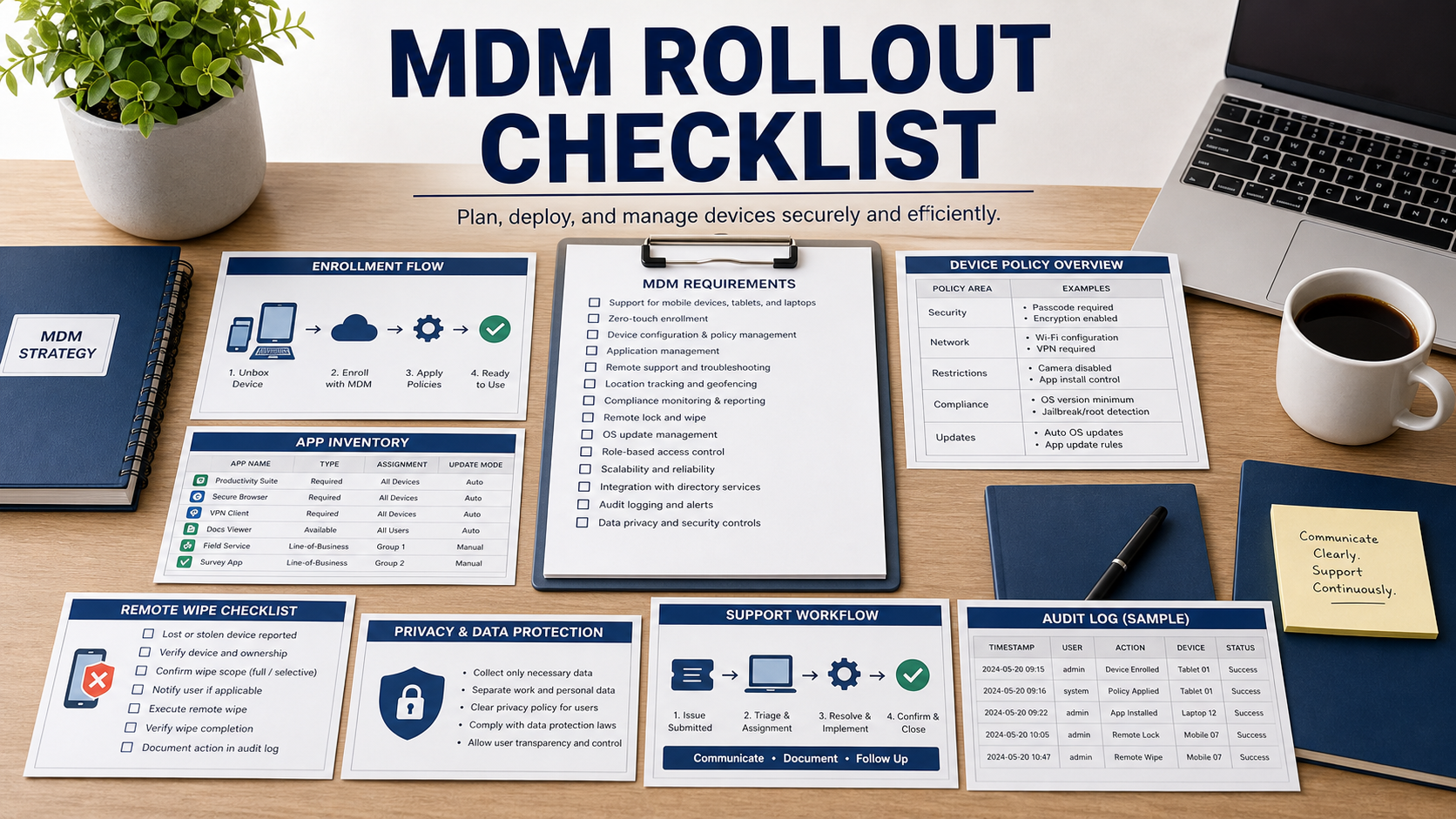
NIST SP 800-124 Rev. 2 treats mobile device security as a lifecycle: select, deploy, manage, monitor, and retire devices while accounting for threats to devices, networks, applications, and user behavior. A good MDM purchase should therefore be tested as a rollout workflow, not just as a policy console.
The hardest MDM problems often happen outside the demo: employees resist enrollment, personal devices raise privacy concerns, remote wipe rules are misunderstood, support cannot unlock users quickly, or compliance reports do not prove what leadership needs. Build the buying checklist around those rollout failures.
Separate Company-Owned And Personal Device Policy
Do not use one policy conversation for every device. Company-owned devices may allow stronger control, while personally owned devices need a clear boundary between work data and personal activity. Ask the vendor to show what the admin can see, what the employer cannot see, and how that is communicated to users.
The rollout plan should include consent language, acceptable use, lost-device reporting, employee departure steps, and support expectations. If the product cannot explain personal data boundaries plainly, adoption will be harder.
Test Enrollment Before Buying
Enrollment should be tested with real user groups: new hires, executives, field staff, contractors, shared devices, and remote users. Ask how the product handles failed enrollment, ownership changes, device replacement, recovery codes, and users who skip required steps.
The demo should also show how policies are staged. A good rollout may start with visibility, then enforce passcodes, encryption, minimum OS version, work app controls, and compliance actions after the team understands breakage risk.
Make Remote Wipe Scope Explicit
Remote wipe is one of the most misunderstood MDM features. Ask whether the product supports full device wipe, selective work-data wipe, app data removal, token revocation, and lost-mode workflows. Then document which action applies to company-owned devices, personal devices, and employee exits.
Every wipe action should be logged. The help desk should know who can approve it, how identity is verified, what evidence is retained, and how accidental wipe risk is reduced.
Connect Mobile Policy To Real Threats
NIST’s Mobile Threat Catalogue is useful because it shows that mobile risk includes malicious apps, network threats, device loss, credential theft, configuration weakness, and user behavior. Ask the vendor which controls map to the risks your organization actually faces.
Do not buy controls you cannot enforce. If the business will not block unmanaged devices, restrict risky apps, require current operating systems, or remove work data after departure, the MDM tool will report risk without reducing it.
MDM Software Review Table
| Requirement | What to ask in the demo | Why it matters |
|---|---|---|
| Enrollment | Enroll a real test device and recover from a failed enrollment. | Rollout friction determines adoption. |
| BYOD boundary | Show what admins can see, wipe, and report on personal devices. | Privacy confusion can block deployment. |
| Policy controls | Apply passcode, encryption, OS version, app, and compliance rules. | Policy must be enforceable without breaking operations. |
| Remote actions | Show selective wipe, full wipe, token revocation, and audit logs. | Lost-device response needs precision and evidence. |
| Support workflow | Show help desk roles, user recovery, escalation, and reporting. | MDM fails when support cannot resolve user issues quickly. |
Questions To Ask Before Rollout
- Which device types and ownership models are in scope on day one?
- What can administrators see on personal devices, and how is that explained to employees?
- Can work data be removed without wiping personal photos, messages, or unrelated apps?
- How does the tool handle OS update visibility and minimum version enforcement?
- What happens when a device is lost, replaced, transferred, or used by a contractor?
- Can support staff resolve enrollment problems without full administrator rights?
- What audit report proves a device was compliant at a specific time?
Red Flags In This Rollout
The vendor demo never shows a failed enrollment, user recovery, or device replacement path.
Remote wipe is discussed broadly, but the quote does not separate full wipe from work-data removal.
Privacy communication is left to HR or legal later, even though the tool changes what the company can monitor.
Source Links
- NIST SP 800-124 Rev. 2: Guidelines For Managing Mobile Device Security
- NIST Mobile Threat Catalogue
- FTC: Data Security
- FTC: Protecting Personal Information
FAQ
Is MDM only for company-owned phones?
No. MDM can support company-owned and personally owned devices, but the policies, privacy notices, and wipe scope should be different.
What should be tested before rollout?
Test enrollment, policy staging, work app access, remote actions, lost-device response, employee exit, and help desk recovery.
Can MDM wipe only work data?
Some configurations support selective work-data wipe. Buyers should verify exactly which device and ownership models support it before rollout.
How should privacy be handled?
Tell users what the company can see, what it cannot see, what actions it can take, and how support and security teams use that information.
What reports matter most?
Useful reports show enrollment status, compliance, OS version, encryption, risky configurations, remote actions, and audit history by owner and device group.
Related Software Buyer Guide Guides
- Identity Governance Software Checklist
- Endpoint Encryption Software Checklist
- Data Classification Software Checklist
MDM succeeds when users can enroll, support can recover them, security can enforce policy, and everyone understands the boundary between work data and personal life.