
Short answer: endpoint encryption software is ready to roll out only when it proves real device coverage, stages policy deployment, escrows recovery keys securely, logs every key retrieval, handles lost-device evidence, controls removable media, and gives the help desk a tested recovery procedure.
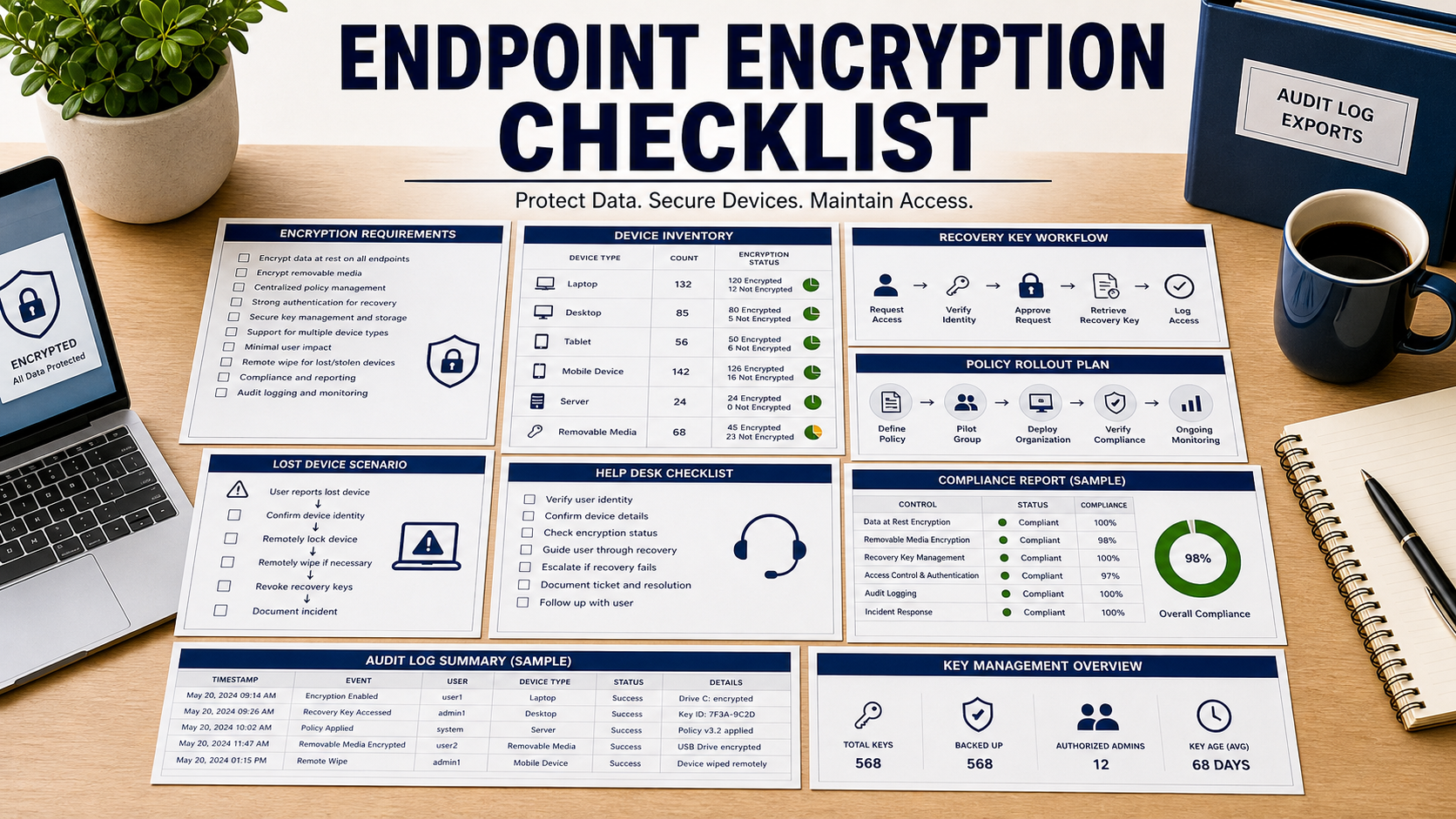
Encryption is not the hard part. The hard part is knowing which devices are encrypted, which are not, who can recover them, and what proof exists when a laptop is lost.
NIST SP 800-111 is still the direct NIST reference for storage encryption on end-user devices, including laptops, desktops, mobile devices, and removable media. NIST SP 800-124 Rev. 2 adds the mobile-device reality: devices connect from everywhere, process sensitive data, and need centralized management. A rollout plan should reflect both.
Start With Real Device Coverage
Ask the vendor to import or discover the actual fleet: laptops, desktops, tablets, mobile devices, shared workstations, remote users, contractors, and removable media. Then compare that list with your identity provider, MDM, directory, and asset records.
A compliance dashboard is weak if it only reports enrolled devices. The demo should show unsupported devices, stale check-ins, duplicate records, and devices that have never reported encryption status.
Define What Counts As Encrypted
The product should distinguish full-disk encryption, file or folder encryption, removable media encryption, mobile device encryption, suspended protection, failed encryption, and recovery mode.
Ask what data fields prove status: encryption state, algorithm or platform control, last check-in, policy version, user, device identifier, recovery key escrow status, and exception reason.
Stage The Rollout By Risk
Do not encrypt the whole fleet on day one. Pilot remote laptops, executive devices, shared devices, and devices with known hardware or firmware differences. Include offline users and low-bandwidth users in the pilot.
The quote should include rollout rings, failure handling, rollback limits, user communication, support staffing, and a pause condition if failures spike.
Test Recovery Key Escrow
Recovery keys should be escrowed before enforcement. The tool should restrict who can retrieve keys, require a reason, log retrieval, support dual approval if needed, and keep the recovery workflow available during outages.
Ask the vendor to recover one test device during the demo. If the demo stops at “the key is stored,” the team has not tested the business continuity risk.
Write The Help Desk Runbook Before Rollout
The help desk needs a script for locked devices, forgotten credentials, hardware replacement, traveling users, terminated employees, and suspected theft. Each scenario should say who verifies identity and when a security team approval is required.
Good software makes the runbook safer by showing device ownership, encryption state, recent check-in, key retrieval history, and whether the requester is allowed to receive help.
Document Lost-Device Evidence
FTC small business cybersecurity guidance specifically calls out full-disk encryption for laptops and mobile devices that connect remotely. For a lost device, the tool should export evidence that the device was encrypted before it disappeared.
Ask for a lost-device report with device owner, last check-in, encryption state, policy version, recovery key status, remote action history, and timestamped audit trail.
Control Removable Media Separately
NIST SP 800-111 treats removable media as part of the storage-encryption problem. A laptop encryption rollout does not automatically control USB drives, external disks, exported archives, or local backups.
Ask whether removable media can be blocked, encrypted, allowed by exception, limited to managed devices, or logged for review. Exceptions should expire and have an owner.
Protect Recovery Data Itself
Recovery keys, device identifiers, ownership data, and lost-device reports are sensitive operational records. The tool should support role-based access, audit logs, retention rules, and export controls.
FTC personal information guidance starts with knowing what information the business has and protecting what it keeps. Encryption management data should be covered by the same discipline.
Endpoint Encryption Software Review Table
| Review area | What to test | Rollout risk |
|---|---|---|
| Inventory | Compare enrolled devices with asset and identity records | Unenrolled devices create false compliance. |
| Status proof | Show encryption state, last check-in, policy version, and exception | Dashboards can hide failed or stale devices. |
| Recovery | Recover a test device and review key retrieval logs | Weak recovery can lock out legitimate users. |
| Lost device | Export timestamped proof of encryption before loss | Security teams need evidence, not screenshots. |
| Removable media | Test block, encrypt, allow-list, exception, and reporting rules | External storage can bypass laptop controls. |
Questions To Ask Before Approval
- Does the dashboard show unenrolled, stale, unsupported, and failed devices?
- What exact fields prove a device was encrypted at a point in time?
- Can rollout be staged by device group, user risk, location, or business unit?
- Are recovery keys escrowed before encryption enforcement starts?
- Who can retrieve a key, and is every retrieval logged with a reason?
- Can the help desk recover a device during an identity or network outage?
- How are removable media and local backups controlled?
- What evidence is exportable after a lost or stolen device?
Buying Red Flags
The vendor promises “100% encrypted” reports but cannot show how unenrolled or stale devices are counted.
Recovery keys exist, but key retrieval is not logged, reason-coded, or restricted by role.
The rollout plan ignores offline users, firmware failures, removable media, and help desk volume.
Source Links
- NIST SP 800-111: Storage Encryption Technologies For End User Devices
- NIST SP 800-124 Rev. 2: Managing Mobile Device Security
- FTC: Cybersecurity For Small Business
- FTC: Protecting Personal Information
- FTC: Data Security Guidance For Businesses
FAQ
Is endpoint encryption enough by itself?
No. It protects data at rest, but the organization still needs accurate inventory, access controls, patching, monitoring, recovery, and incident handling.
What should be tested before rollout?
Test one encrypted device, one failed device, one offline user, one recovery, one removable drive rule, and one lost-device evidence export.
Why is recovery key logging important?
Recovery keys can unlock protected devices, so retrieval should be restricted, justified, timestamped, and reviewable.
Should removable media be part of the project?
Yes, if sensitive data can be copied to external storage. The policy should define blocking, encryption, exceptions, and reporting.
What is the biggest rollout risk?
The biggest risk is turning on encryption before inventory, key escrow, recovery, exceptions, and support procedures have been tested.
Related Software Buyer Guide Guides
- Mobile device management software checklist
- Data classification software checklist
- Log management software checklist
Before rollout, recover a test device, export lost-device proof, review the key retrieval log, and confirm the dashboard counts devices that are not yet compliant.