
Short answer: evaluate privileged access management software by making the demo prove the whole control path: discover privileged accounts, reduce standing admin rights, require strong authentication and just-in-time approval, protect service accounts, record or log sensitive sessions, support emergency access, and export audit evidence that maps to least privilege.
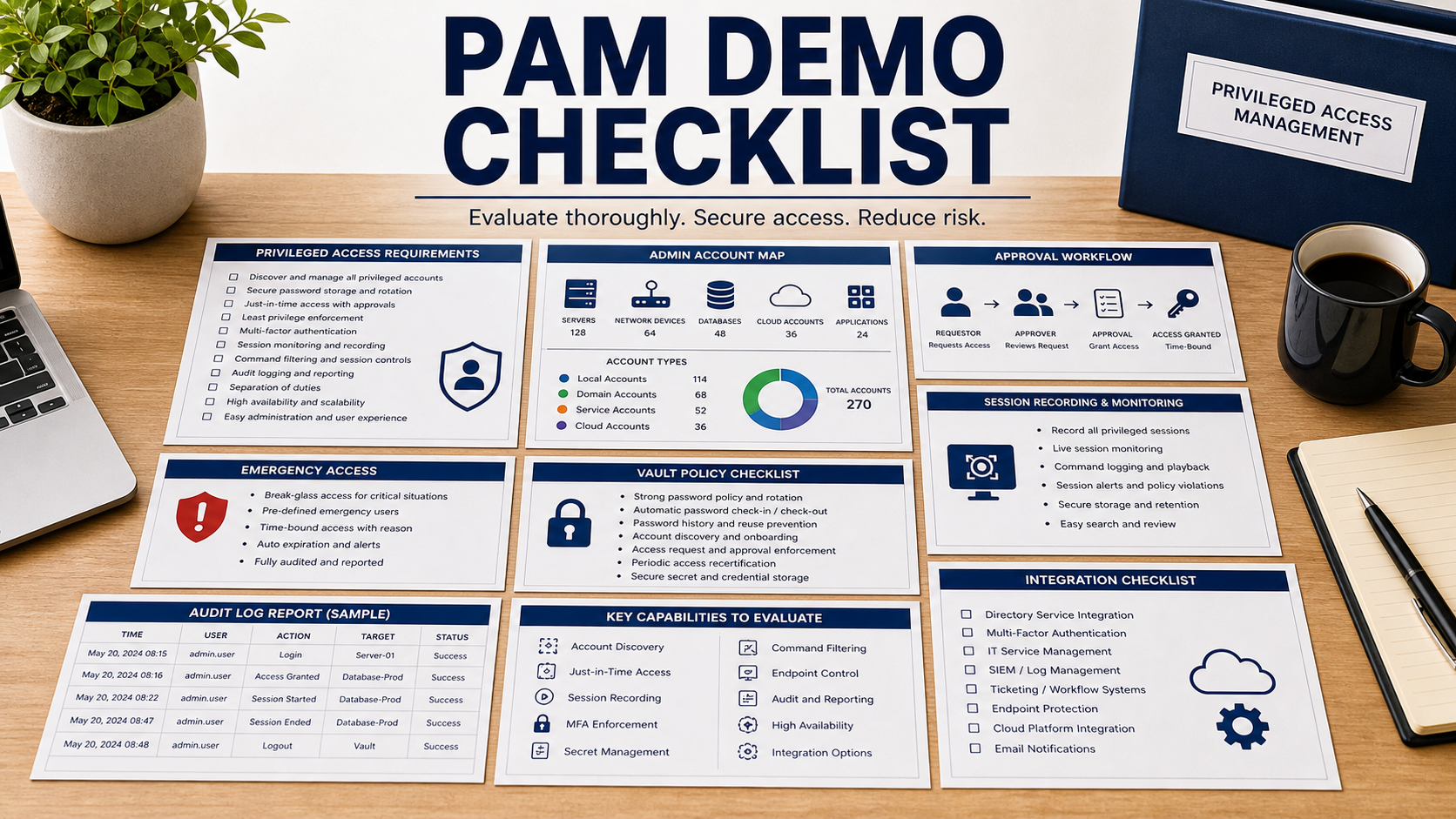
PAM projects fail when buyers focus only on password vaulting. The real question is whether the organization can find privileged access, reduce it, grant it only when needed, watch high-risk actions, and recover safely when the PAM system itself is unavailable.
NIST SP 800-53 includes access control concepts such as least privilege and privileged account management. NIST SP 800-207 frames access as continuous evaluation rather than one-time trust. NIST digital identity guidance reinforces authentication strength. Use those principles to build a demo script, not a feature wish list.
Start With Privileged Account Discovery
Ask the vendor to discover domain admins, local admins, cloud admins, database admins, network device accounts, emergency accounts, shared accounts, service accounts, and application secrets in a test environment. The demo should show unknown accounts, stale accounts, and ownership gaps.
If discovery depends on clean identity data that you do not have, note that as rollout work. PAM cannot manage accounts the team has not found or cannot assign to an owner.
Test Just-In-Time Access, Not Standing Admin
Standing admin rights create unnecessary exposure. Ask the product to show a request, approval, time-limited elevation, command or session access, automatic revocation, and evidence export. The requester, approver, target system, reason, and duration should be visible.
The demo should include denial and expiry paths too. A product that grants access cleanly but cannot remove it reliably is not reducing risk.
Include Service Accounts And Secrets
Human admins are only part of the problem. Service accounts, scripts, build systems, automation jobs, and application credentials often hold powerful permissions. Ask how the tool discovers them, rotates credentials, avoids breaking dependencies, and handles owners who no longer exist.
If the PAM tool does not manage secrets directly, ask which secrets management system it integrates with and how audit trails connect across tools.
Plan Break-Glass Before You Need It
Emergency access should be designed, not improvised. Ask how break-glass accounts are stored, monitored, tested, approved, rotated after use, and reported. The process should work during identity provider outage, network disruption, ransomware response, or PAM service outage.
Break-glass should not become a permanent bypass. The quote and implementation plan should include periodic testing and review.
PAM Software Review Table
| Requirement | What to ask in the demo | Why it matters |
|---|---|---|
| Discovery | Find privileged, shared, stale, local, cloud, and service accounts. | Unknown privilege cannot be governed. |
| JIT workflow | Request, approve, elevate, revoke, and export evidence. | Standing access should shrink over time. |
| Authentication | Show MFA, risk signals, session constraints, and reauthentication. | Privileged access needs stronger proof than ordinary login. |
| Service accounts | Rotate credentials without breaking dependent systems. | Automation accounts often hold hidden privilege. |
| Break-glass | Test emergency access, monitoring, rotation, and review. | Emergency accounts can become permanent backdoors. |
Questions To Ask Before The Demo
- Which privileged account types can the tool discover without manual import?
- Can access be granted just in time and removed automatically?
- What MFA or reauthentication is required for high-risk sessions?
- Can sessions be recorded, logged, or exported without over-collecting sensitive data?
- How are service accounts, scripts, and application credentials rotated safely?
- What happens if the PAM tool or identity provider is unavailable?
- Can audit reports show who requested access, who approved it, what happened, and when access ended?
Red Flags In This Demo
The demo starts with manually entered admin accounts instead of discovery.
Approvals are shown, but revocation, expiry, denial, and emergency access are skipped.
Service accounts and automation credentials are pushed to a later phase without a risk register.
Source Links
- NIST SP 800-53 Rev. 5: Security And Privacy Controls
- NIST SP 800-207: Zero Trust Architecture
- NIST SP 800-63-4: Digital Identity Guidelines
- NIST SP 800-63B: Authentication And Lifecycle Management
- FTC: Data Security
FAQ
Is PAM only a password vault?
No. A useful PAM program includes discovery, least privilege, approval workflow, strong authentication, session evidence, service account handling, and emergency access controls.
What should be tested in a PAM demo?
Test account discovery, request and approval, just-in-time elevation, session logging, automatic revocation, service account rotation, and break-glass use.
Should PAM cover service accounts?
Yes. Service accounts and automation credentials often carry powerful access and should have owners, rotation plans, and audit trails.
What is break-glass access?
It is emergency access used when normal access paths fail. It should be monitored, tested, limited, and rotated after use.
What evidence should PAM produce?
Look for request records, approver records, target systems, session logs, command evidence where appropriate, revocation time, and exception reports.
Related Software Buyer Guide Guides
- Identity Governance Software Checklist
- Secrets Management Software Checklist
- Log Management Software Checklist
PAM software is ready for purchase when the demo proves privilege can be found, granted, observed, removed, and recovered under stress.