
Buy ransomware backup software only if it can prove recoverability under attack: immutable or locked copies, admin separation from normal production accounts, at least one recoverable copy outside the attack path, tested restores, clear RPO/RTO evidence, usable alerts, and support terms that still apply during an incident.
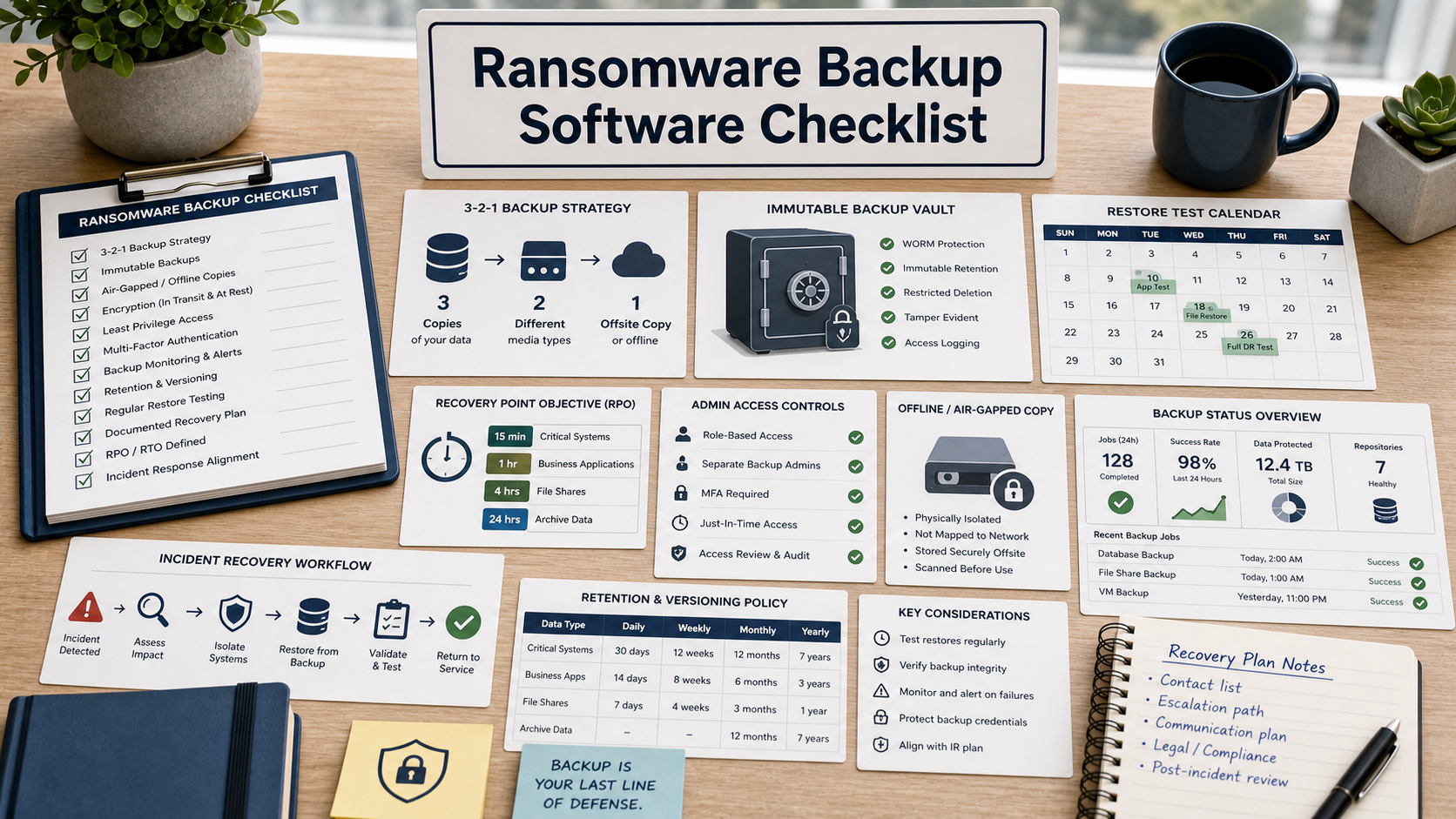
The buying question is not whether a vendor can copy data. The question is whether your team can restore clean systems after attackers have encrypted endpoints, abused admin credentials, deleted cloud objects, and looked for backup consoles. CISA and NIST guidance both push organizations toward preparation, tested recovery, and protection of backup data from destructive events.
For a small IT or security team, this means the demo should show recovery paths, not only storage graphs. Ask the vendor to walk through a ransomware scenario where production identity is compromised, the network is partially unavailable, and leadership needs evidence about what can be restored first.
Start With The Recovery Scenario, Not Storage Size
Define the systems that must come back first: identity, endpoint management, file shares, accounting, customer systems, ticketing, and security logs. Then ask the vendor to map each system to backup frequency, retention, restore target, and expected recovery order.
RPO and RTO should be written in operational terms. RPO asks how much data you can afford to lose. RTO asks how long the restore can take. A dashboard claim is not enough unless the vendor can show test reports, restore history, and the time needed to rehydrate data at your expected volume.
Confirm Immutable And Separated Copies
Immutable storage, retention lock, object lock, and air-gapped copy are not the same thing. The product should explain which copies cannot be deleted or shortened by a compromised administrator, how long the lock lasts, who can change the policy, and whether emergency support can override it.
At least one recovery path should sit outside the normal production blast radius. That may involve separate credentials, separate tenants, offline media, separate cloud accounts, or a managed vault. The important question is whether the same identity compromise can delete both production and backups.
Separate Backup Administration From Production Administration
Ransomware operators often look for administrative access. Ask whether backup admins use separate accounts, MFA, role-based access, just-in-time elevation, approval workflows, and tamper-evident logs. A backup console protected by the same broad admin group as production is a weak recovery control.
Also ask how the tool protects API keys, service accounts, agents, and deletion privileges. If a compromised endpoint agent can wipe backup sets, the architecture needs another control before you trust it.
Require Restore Tests As A Buying Condition
A vendor demo should include a restore test, not just a backup job success screen. Ask for file-level restore, full-system restore, identity-system restore, SaaS restore if relevant, and a clean-room or isolated network workflow for malware review.
The strongest buying evidence is a repeatable restore report: date, system, backup set, restore target, elapsed time, errors, validation steps, and who approved the result. Without that evidence, backup success can become a false sense of safety.
Ransomware Backup Software Review Table
| Requirement | What to ask in the demo | Risk if skipped |
|---|---|---|
| Recoverability | Show a restore test for the first three systems you would recover. | Backup jobs may succeed while business recovery fails. |
| Immutability | Prove who can shorten, delete, or override retention locks. | A compromised admin may erase backups before encryption is noticed. |
| Admin isolation | Show separate roles, MFA, audit logs, and emergency access controls. | Production compromise can become backup compromise. |
| Offline or separated copy | Explain which copy survives tenant, domain, or cloud-account compromise. | All copies may sit inside the same attack path. |
| Evidence and support | Provide restore reports, alert examples, export logs, and incident support limits. | Leadership may not know what is restorable during the incident. |
Questions To Ask Before Buying
- Which backup copy cannot be deleted by a compromised production admin?
- Can the vendor show a restore test for identity, file, endpoint, and SaaS data?
- How are backup admin roles separated from domain or cloud administrators?
- What alerts fire when backup jobs fail, retention changes, agents go offline, or deletion attempts occur?
- How long would it take to restore the first critical system at our data volume?
- What support response applies during an active ransomware incident?
- Can restore evidence be exported for insurance, legal, or board reporting?
Red Flags In This Purchase
The vendor says immutable but cannot show who can change the lock period or delete a protected copy.
The demo highlights backup success percentages but never performs a timed restore.
The same production administrator account can manage, delete, and restore all backup data without an independent approval trail.
Standards, Frameworks & Sources Reviewed
- CISA: StopRansomware Guide
- CISA: Secure Your Business
- NIST SP 1800-11: Data Integrity – Recovering From Ransomware
- FTC: Data Security
FAQ
Is immutable backup enough for ransomware recovery?
No. Immutability helps, but you also need separated administration, restore testing, clean recovery targets, alerts, and a recovery order that matches business priorities.
What is the difference between RPO and RTO?
RPO is the amount of data loss the organization can tolerate. RTO is the time it can tolerate before a system is restored. Both should be tested, not guessed.
Should backup admins be separate from normal admins?
Yes. Separate accounts and permissions reduce the chance that a production credential compromise also controls the backup system.
Do SaaS apps need ransomware backup coverage?
Often yes. Ask which SaaS platforms are covered, what objects can be restored, how permissions are handled, and whether retention meets your compliance needs.
What evidence should a buyer request before purchase?
Ask for sample restore reports, alert examples, audit logs, retention lock behavior, support terms, and a demo restore for your most critical data type.
Related Software Evaluation Briefs
- Incident Response Software Checklist
- Endpoint Encryption Software Checklist
- Log Management Software Checklist
Ransomware backup software is worth buying only when it can prove, with tested evidence, that attackers cannot erase every recovery path.