
Short answer: workflow automation software should connect repeatable work across apps while preserving approvals, permissions, error handling, audit logs, data mapping, ownership, and rollback. Before buying, test the tool on one real workflow that breaks today.
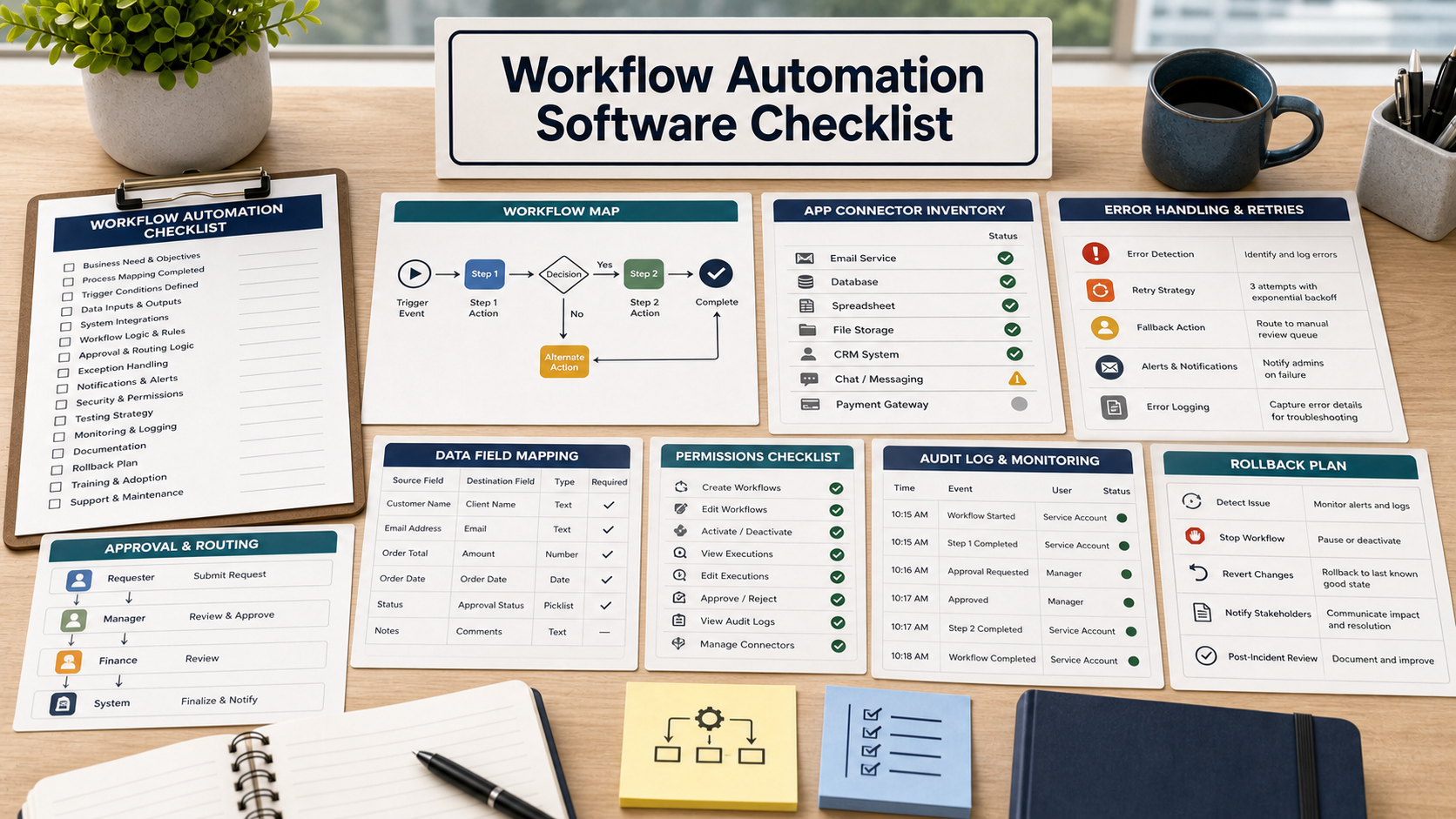
This guide is for a small operations team that is tired of copying data between forms, spreadsheets, project boards, ticketing tools, and finance systems. Automation sounds like relief. It can also create silent mistakes if nobody owns the flow.
Do not buy workflow automation software because a demo shows a neat trigger. Buy it only if the tool can handle approvals, exceptions, permissions, and recovery when the real process does not behave cleanly.
Start With One Painful Workflow
Pick one workflow before the demo: customer onboarding, invoice approval, employee access request, support escalation, renewal reminder, or procurement review. Write down the trigger, data fields, approvals, systems, exceptions, and final record.
If the vendor cannot model that workflow without hand-waving, the tool may be too shallow or too complex for your team.
Triggers And Conditions Need Guardrails
Ask how automations start: form submission, email, field update, webhook, schedule, status change, or manual approval. Then ask how conditions prevent the wrong automation from firing.
A trigger without guardrails can duplicate records, notify the wrong person, or move sensitive data to the wrong place.
Permissions Should Follow The Work
Ask what permissions the automation account needs in each connected app. Broad admin access may be easy to demo but risky to operate. The tool should support least-privilege design, role controls, and logs of who changed an automation.
NIST Cybersecurity Framework categories around identity, access, and asset management are a useful lens: know what systems are connected, who can change them, and how activity is tracked.
Workflow Automation Buying Table
| Buying area | Demo question | Risk if weak |
|---|---|---|
| Connectors | Which apps are native, beta, webhook-only, or custom? | Critical steps become fragile workarounds. |
| Approvals | Can approvals pause, reject, reroute, and record decisions? | Automation bypasses human review. |
| Errors | How are failed steps retried, escalated, and repaired? | Failures hide until customers or staff notice. |
| Data mapping | Can field changes be tested before launch? | Bad mappings corrupt downstream records. |
| Audit log | Who changed the workflow, when, and what happened? | Teams cannot investigate incidents. |
Error Handling Is A Buying Feature
Ask what happens when an app is down, a required field is missing, an approval is late, a duplicate record exists, or an API limit is hit. The answer should include retry rules, alerts, logs, owner assignment, and manual repair options.
Data Mapping And Testing Should Be Visible
Ask to see how fields move from one system to another. Can the team preview test runs? Can it use a sandbox? Can it validate required fields before writing to production systems?
Questions To Ask Before Buying
- Which workflow will prove value in the demo?
- Which connected apps require admin permissions?
- How are approvals, rejections, and exceptions logged?
- What happens when a step fails?
- Can automations be tested before launch?
- Can a bad automation be paused or rolled back quickly?
- Who owns maintenance after the first setup?
Source Links
- NIST Cybersecurity Framework
- FTC: Data security guidance for businesses
- NIST: Small Business Cybersecurity Corner
- NIST CSRC: Risk Management Project
FAQ
Should workflow automation replace approvals?
No. It should route approvals more reliably while preserving decision records and escalation paths.
What should we test in the demo?
Use one real workflow with messy data, late approvals, exceptions, and at least two connected systems.
Is no-code automation always safer?
No. No-code tools still move data and trigger actions. Permissions, logs, and error handling still matter.
Who should own automations?
Each workflow needs a business owner and a technical owner. Without ownership, automations age quietly.
What is the biggest buying risk?
The biggest risk is creating automations that work in the demo but fail silently when real data changes.
Related Software Buyer Guide Guides
- Project management software buying checklist
- Help desk software buying checklist
- Document management software buying checklist
Before buying, ask the vendor to automate one real workflow that includes an exception, an approval, and a failed step.
Run a final evidence check
For Workflow Automation Software Checklist Before Buying, write down the owner, the evidence that proves completion, the exceptions that need approval, and the documents due at closeout. Match written requirements to representative users, data, integrations, permissions, failure handling, support, contract terms, export, and exit.
Show what was checked, what remains uncertain, who accepted the remaining risk, and when the decision should be reviewed.
- Name the decision owner and approver.
- List assumptions and exclusions in writing.
- Define acceptance evidence and exception handling.
- Keep the final documents and source links together.
- Set a date to review the decision after real use.
Keep a compact approval record
Save the final scope or requirements, dated source links, written answers, accepted exceptions, named owners, and acceptance evidence in one location. Record which facts were verified directly, which statements came from a seller or provider, and which questions remain open. This record makes later corrections, support escalation, warranty review, renewal, or project closeout easier to handle without relying on memory.